


Half-Life 2: Lost Coast

|
This article is non-canon. |  |
|---|---|---|
The subject matter of this article does not take place in the "real" Half-Life and Portal universe and is considered non-canon. |

| |
| Half-Life 2: Lost Coast | |
|---|---|
| Developer(s) | |
| Release date(s) |
October 27, 2005 |
| Genre(s) | |
| Mode(s) | |
| Platform(s) | |
| Distribution | |
| System req |
Half-Life 2, 2.9 GHz processor, 1 GB RAM, DirectX 9 compatible card |
| Input | |
| Engine | |
| Composer(s) | |
| Previous game | |
| Next game | |
Half-Life 2: Lost Coast is a technology demo showing off the Source engine's HDR rendering capabilities. The town of St. Olga, where the game is set, was originally slated to take place during the Coast chapters, but was dropped. Lost Coast was released on October 27, 2005[1] as a free download to all owners of Half-Life 2.
Contents
Plot[edit]

The level begins with Gordon Freeman finding himself near a group of decaying piers, underneath a monastery set up on rocks and overlooking the small town of St. Olga.
A fisherman standing on a dock recognizes the player as Gordon, although he cannot accurately remember his last name, and tells him that the Combine have made a base in the area. He lets Freeman through a gate and tells him to "take out that gun".
The gate leads to a winding path along the side of the outcrop the church is located. The player soon encounters resistance in the form of Combine Soldiers, some of whom rappel from the cliffs above. As he proceeds up the cliff, a launcher based in the church at the top begins bombarding the nearby town with Headcrab Shells. Upon reaching the top of the cliff, the player finds the church and its courtyard unguarded. The church itself is relatively undamaged except for the religious paintings on the walls, the faces of all but a few of the characters having been rubbed away.
Inside the building, the Combine have constructed the shell launcher. At regular intervals, shells are loaded into the chamber and launched at the town. Gordon destroys the launcher by jamming the mechanism with debris, and an alarm is triggered, prompting the Combine to launch a second attack on the church itself, with a Hunter-Chopper acting as air support. Gordon fights his way out of the church and shoots down the aircraft with an RPG. After completing the task, Gordon rides an elevator back down to the dock, where he meets up with the Fisherman again, at which point the level fades to black, with the old man commenting that Gordon is "getting fuzzy around the edges".
Development[edit]
Level design[edit]

Lost Coast was originally conceived as a part of the Highway 17 chapter in Half-Life 2 (Highway 17's development name was "Coast", hence the name "Lost Coast"), but was later discarded during development. As a result, Lost Coast features minor storyline details that were removed from Half-Life 2, such as the Headcrab Shell launchers. Each area of the level was designed with a specific purpose. An Eastern Orthodox architectural style was deliberately chosen for the monastery, as buildings of this type "are very colorful and have a large variety of materials" and are "often lit naturally, with extremes of darkness and brightness," providing an ideal showcase for the HDR lighting effects.[2] Valve also thought that the use of a monastery would help provide a starker contrast between old human architecture and futuristic Combine technology found within it.[2] The cliffside that leads to the monastery had a gameplay-oriented purpose, and was meant to emulate a similar cliffside combat scene in Half-Life. The cliffside also forces the player to be observant of threats from above and below, breaking from normal horizontal combat.[2] The monastery's courtyard was designed as an area where the player recovers from the cliffside combat, while also presenting a contained combat arena later in the level in which the player must hold their ground while they are attacked from multiple directions.[2]
High-dynamic-range rendering[edit]

The goal of Lost Coast was to demonstrate the new high-dynamic-range rendering implemented into the Source game engine.[3] Valve first attempted to implement high-dynamic-range rendering in Source in late 2003. The first method stored textures in RGBA color space, allowing for multisample anti-aliasing and pixel shaders to be used, but this prevented alpha mapping and fog effects from working properly, as well as making textures appear sharp and jagged.[4] The second method involved saving two versions of a texture: one with regular data, and the other with overbrightening data. However, this technique did not allow for multisample anti-aliasing and consumed twice as much video card memory, making it infeasible.[4] The third method, shown at the E3 convention in 2005, used floating point data to define the RGB color space, allowing for reasonably efficient storage of the high-dynamic-range data. However, this method also did not allow for multisample anti-aliasing, and was only compatible with Nvidia video cards, leaving ATI cards unable to run high dynamic range.[4] The fourth and final method compromised between the second and third methods, using overbrightening textures sparingly and allowing ATI cards to render HDR in a different way to the Nvidia ones while nearly producing the same end result.[4]
The final version of Valve's high-dynamic-range technology adds a significant number of lighting effects to the engine, aimed at making the game appear more realistic. Bloom shading was introduced, blurring bright edges in the game world and emulating a camera's overexposure to light.[5] This is combined with exposure control to tailor the effect to represent the human eye. For example, as the player exits a dark area into a light area, the new area is initially glaringly bright, but quickly darkens, representing the adjustment of the player character's eyes to the light.[6] New cube mapping techniques allow the reflection cast by an object to correspond with the brightness of the light source, and lightmaps enable light bouncing and global illumination to be taken into account in the rendering.[5] Refraction effects were added to make light account for the physical attributes of an object and to emulate the way light is reflected by water.[5] The Lost Coast level is specifically designed to showcase these effects. It uses the sea and beach as opportunities to demonstrate water-based effects, the monastery to demonstrate bloom from its whitewash walls, and the sanctuary to provide the means to show refraction through stained glass windows and cube maps on golden urns and candlesticks.[7]
As a technology showcase, Valve considered Lost Coast to have very demanding system requirements.[8] The game runs on computers with specifications lower than what is recommended, albeit without some key features such as high dynamic range. If a non-high-dynamic-range-capable card is used, the developer commentary is changed slightly to reflect this. For example, Gabe Newell would describe the effects that are seen in a different manner.[9]
Commentary system[edit]
In addition to a showcase for visual improvements, Lost Coast acted as a testbed for Valve's commentary system. When the feature is enabled, additional items appear in the game that can be interacted with to play an audio commentary. Each audio piece ranges from ten seconds to a minute of commentary. Players hear the developers talk about what the player is seeing, what is happening, why they made certain decisions, and what kinds of challenges they faced. Commentary tracks are represented by floating speech bubbles called commentary nodes.[10] Valve intended for players to first play the level with commentary disabled, and after completing the level, play it again with commentary enabled, learning about each new stage as they progress.[11] The company has made the commentary system standard in all of its later video games.[12]
Release and reception[edit]

Lost Coast was released on October 27, 2005, as a free download from Valve's Steam content delivery service to anyone who purchased Half-Life 2.[13] People who received Half-Life 2 as a gift from Valve's online store were not eligible to download the level. Valve announced on May 30, 2007 that Lost Coast, along with Half-Life 2: Deathmatch, would be made available for free to owners of ATI Radeon cards.[14] It was later released without charge to Nvidia graphics card owners along with Half-Life 2: Deathmatch, Peggle Extreme and Portal: First Slice.[15]
Lost Coast was generally well received by video game critics. 1UP.com enjoyed the amount of detail, including the graphics, puzzles, and intelligent enemies, saying, "Valve just packed more atmosphere into a tiny snippet than most shooters muster, period." The review also praised the level's commentary system, calling it an informative addition, and enjoyed the interesting and insightful comments made by some of its creators.[16] The level satisfied UGO because "it would be harder not to enjoy this level in all its beautifully rendered glory—even after you've broken all the windows and spattered the walls with Combine blood,"[17] and GameSpot commented that "the textures in Lost Coast are noticeably more detailed and numerous than in the retail game." The review concluded hoping that the features introduced in Lost Coast would be included in Valve's future releases.[9]
Negative reaction to the game focused on its length and gameplay. 1UP.com and UGO both considered it short;[16][17] Shawn Elliott of 1UP.com described it as "a lickety-split run through postcard-pretty tide pools, up cliffs, and into a church turned Combine outpost".[16] UGO's Nigel Grammer stated that Lost Coast`s gameplay seemed to be secondary to the level's graphics.[17] Lost Coast`s gameplay disappointed Brad Shoemaker of GameSpot, who compared it to that of Half-Life 2 and considered them to be very similar, saying that it "isn't going to set the world on fire".[9]
Soundtrack[edit]
The only audio track featured in Lost Coast is Dark Interval, also used in Half-Life 2: Episode Two. It plays when first entering the St. Olga monastery.
Trivia[edit]
- The Hunter-Chopper that opposes the player towards the end of the demo behaves and sounds like the Combine Gunship; it shoots down incoming rockets and its pulse gun is much more accurate.
- In the Source SDK Base, a flyby of this level can be launched as a video stress test.
Gallery[edit]
Logos and banners[edit]

Steam header.

Steam hero image.

Steam logo.


Concept art[edit]
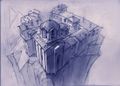
Concept art for St. Olga's monastery church.

Ditto.

Ditto.

The Fisherman concept art.

Ditto.

The Fisherman character sheet.


Screenshots[edit]
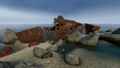
Shipwreck at the feet of the cliff.
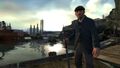
The Fisherman against the sunlight.
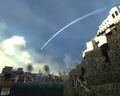
St. Olga being bombarded by Headcrab Shells.
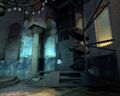
The Headcrab Shell launcher in St. Olga monastery's church.


References[edit]

- ↑ Lost Coast on Steam
- ↑ 2.0 2.1 2.2 2.3 Half-Life 2: Lost Coast commentary
- ↑ Lee, Garnett (2005-08-29). Half-Life 2: Aftermath and Lost Coast. 1UP.com. Retrieved on 2008-11-20.
- ↑ 4.0 4.1 4.2 4.3 Reimer, Jeremy (September 15, 2005). A primer on HDR and a tour of Valve's Lost Coast: The road to HDR. Ars Technica. Retrieved on November 21, 2008. (archived)
- ↑ 5.0 5.1 5.2 Richards, Geoff (June 14, 2005). Lost Coast / Source HDR Feature Set. bit-tech. Retrieved on November 20, 2008. (archived)
- ↑ Richards, Geoff (June 14, 2005). Under & Over Exposure. bit-tech. Retrieved on November 20, 2008. (archived)
- ↑ Richards, Geoff (June 14, 2006). Half Life 2: Lost Coast HDR Eye Candy. bit-tech. Retrieved on November 20, 2008. (archived)
- ↑ Bramwell, Tom (October 28, 2005). HL2 Lost Coast released. Eurogamer. Retrieved on November 20, 2008. (archived)
- ↑ 9.0 9.1 9.2 Shoemaker, Brad (July 28, 2005). Half-Life 2 Lost Coast Hands-On. GameSpot. Retrieved on October 17, 2008. (archived)
- ↑ Half-Life 2: Lost Coast Overview. Planet Half-Life. GameSpy. Retrieved on November 21, 2008. (archived)
- ↑ Richards, Geoff (September 14, 2005). Preview: Half-Life 2: Lost Coast: Thoughts. bit-tech. Retrieved on November 21, 2008. (archived)
- ↑ Steam Marketing Message. Valve Corporation (August 5, 2005). Retrieved on October 17, 2008. (archived)
- ↑ Pinckard, Jane (October 27, 2005). Lost Coast Out Now. 1UP. Retrieved on November 20, 2008.
- ↑ Valich, Theo (May 30, 2007). Valve gives free games to ATI Radeon owners. The Inquirer. Retrieved on May 31, 2007. (archived)
- ↑ Swinburne (January 10, 2008). Free Portal to all Nvidia GeForce owners. bit-tech. Retrieved on November 29, 2008. (archived)
- ↑ 16.0 16.1 16.2 Elliott (October 28, 2005). Half-Life 2: Lost Coast (PC). 1UP. Retrieved on November 20, 2008. (archived)
- ↑ 17.0 17.1 17.2 Grammer, Nigel. Half-Life 2: Lost Coast Review. UGO. Retrieved on November 20, 2008. (archived)
External links[edit]
 Half-Life 2: Lost Coast on Steam
- EuroGamer Half-Life 2: Lost Coast preview
- bit-tech.net Half Life 2: Lost Coast HDR overview
- bit-tech.net Half-Life 2: Lost Coast playtest
- bit-tech.net Half-Life 2: Lost Coast benchmark

