
Developer commentary

|
Warning! This article has yet to be cleaned up to a higher standard of quality, per our Cleanup Project. It may contain factual errors and nonsense, as well as spelling, grammar and structure issues, or simply structure problems. Reader's discretion is advised until fixing is done. |  |
|---|---|---|
You can help clean up this page by correcting spelling and grammar, removing factual errors and rewriting sections to ensure they are clear and concise, and moving some elements when appropriate. |

|
This article would greatly benefit from the addition of one or more new images. | |
|---|---|---|
Please upload one or several relevant images (from canonical / official sources) and place it here. Once finished, this notice may be removed. |


The in-game developer commentary, turned off by default, is intended to give players an insight into the development process of the game as well as offer interesting information which might not have been obvious initially. Valve first introduced the feature in Half-Life 2: Lost Coast. It's since been included with Episode One, Episode Two, Portal, Portal 2, Left 4 Dead, Left 4 Dead 2, Team Fortress 2, and Half Life: Alyx.
Contents
Overview[edit]
Commentary nodes can be activated by enabling developer commentary from the options dialog box. In non-VR titles, pressing the USE key while aiming at a node triggers it to begin playback. The same key again will stop the sound. Proximity from the node is not a factor as one can be activated from any distance as long as it is visible. In Half-Life: Alyx, rather than interacting with nodes, floating headsets appear at each point of interest. Grabbing and putting a headset on will begin playback. A commentary status panel is displayed above the player's off hand which shows the playback progress and the name of the speaker. Removing the headset ends the playback. When dropped, the headset will return to its original location.
The nodes play recordings of Valve team members or voice actors who speak about behind-the-scenes information, including how or why they made the map, an enemy, a character, or a storyline idea, what happened in the earlier iterations of the map or area, and in the voice actors' case, how they performed their roles.
Commentary nodes will sometimes take control of the player's camera in order to show different areas or techniques. An example of this can be seen in Lost Coast; the screen is separated down the center to show the difference in rendering with and without HDR enabled. Activating a node will also trigger a number of side effects depending on the game: temporarily disabling the game's AI, as in in Lost Coast, or rendering the player invulnerable to enemy attacks, as in the Half Life 2 Episodes. To counter this, Achievements cannot be achieved while in commentary mode (except in the case of Portal 2's singleplayer), as it makes the game easier. Activating a commentary node will not stop music or sounds.
In all Valve games, company co-founder Gabe Newell makes the introductory commentary which typically consists of an explanation of how to control the nodes.
Commentary node warp function[edit]
To support debugging and aid movement between nodes without in-game traversal to their map placements, Valve incorporated a hidden function to allow a user to warp between nodes in sequence by triggering a three command shortcut. The shortcut is activated by triggering the commands "lastinv", "+attack2", and "+use" simultaneously (default bindings: 'Q', 'Mouse 2', and 'E').
Upon triggering the shortcut, the player's screen will fade to black and spawn them directly within the map coordinates of the next non-activated node available on that map. Upon further activations, the function will continue to warp the player sequentially to other nodes. As the warp function was designed with debugging node placements and toggleability, activating the shortcut can place the user within geometry or models across all games which feature it.[1]
This shortcut is enabled by default in Half-Life 2: Lost Coast, Episode One, Episode Two, Portal, Team Fortress 2, Left 4 Dead, and Left 4 Dead 2.
Commentary transcripts[edit]
Half-Life 2: Lost Coast[edit]
Half-Life 2: Episode One[edit]
Half-Life 2: Episode Two[edit]
Portal[edit]
Portal 2[edit]
Half-Life: Alyx[edit]
Gallery[edit]
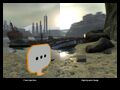
Developer commentary showing HDR in action in Half-Life 2: Lost Coast.

Banner promoting Half-Life: Alyx's Commentary Update.

Floating headset model used for the commentary nodes in Half-Life: Alyx.


List of appearances[edit]
- Half-Life 2: Lost Coast (First appearance)
- Half-Life 2: Episode One
- Half-Life 2: Episode Two
- Portal
- Portal 2
- Half-Life: Alyx


